
To access this utility, click Employer, followed by Edit Employer Details. Sections available for completing/editing under the RTI tab are:
Preferred Government Gateway User ID
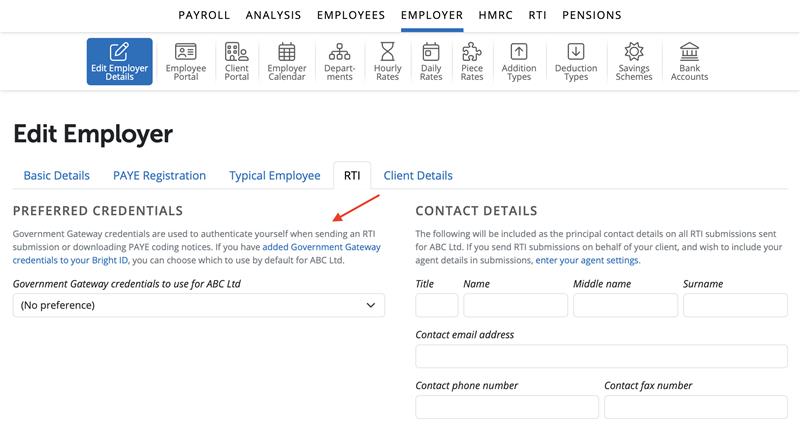
Under > Employer > Edit Employer Details > RTI tab a user can enter or select their preferred Government Gateway credentials to use for an individual employer.
The credentials will be stored on a user level, ie if there are three users on the BrightPay Organisation with access to the same employer and one user only sets up the preferred Government Gateway in their Bright ID and saves this in the employer in BrightPay only that user will see the details saved and not the two other users when they access the employer in BrightPay.
To add Government Gateway credentials to your Bright ID please select the text in blue of 'added Government Gateway credentials to your Bright ID' under the RTI tab in the Employer Edit Details section for the employer and you will be able to add Government Gateway credentials here.
Once added you can select the Government Gateway 'Preferred Credentials' you wish to use for the employer in the dropdown menu. Select 'Save'.
RTI Contact Details
The following will be included as the principal contact details on all RTI submissions sent for the employer. If you send RTI submissions on behalf of your client, and wish to include your agent details in submissions in order to send your RTI Submissions to HMRC.
1) Title and Name
2) Contact Email Address
3) Contact Phone Number and / or Fax number
To add agent credentials to your BrightID, go to the Settings icon on the top right of the screen > under Submissions, select 'Gateway Credentials'
Click 'Add' and enter the Government Gateway User ID and password and Save
Note: Once you've submitted successfully using a particular set of Government Gateway credentials, BrightPay Cloud will automatically set those credentials as the preferred credentials for that employer going forward. You won't need to reselect them for future submissions. Any preferred credentials you've already chosen and saved are left as they are and won't be changed automatically.
BrightPay requires your PAYE reference number to enter an employer onto the system, process payroll and submit information to HMRC. However, if you haven’t received your official PAYE reference yet from HMRC, there’s a useful workaround so you don’t have to delay paying your employees:
You can set up your employer and employees in BrightPay using a temporary dummy PAYE reference (for example, 123/AB12345) until you receive your official details from HMRC. This will allow you to process payroll and calculate pay, tax, and NIC in the meantime.
Please note that no RTI submissions can be made to HMRC until the correct PAYE reference is entered. Once you receive your official PAYE reference from HMRC, update it in Employer > Edit Details > PAYE Registration, and you can then submit your payroll to HMRC from that point.
Comments
0 comments
Article is closed for comments.