
If you have applied an Additional Voluntary Contribution (AVC) to a payslip and you wish this to repeat each pay period, click the 'spanner' icon next to the pension amount fields.
Tick to indicate that you wish to 'persist additional one-off contribution amounts':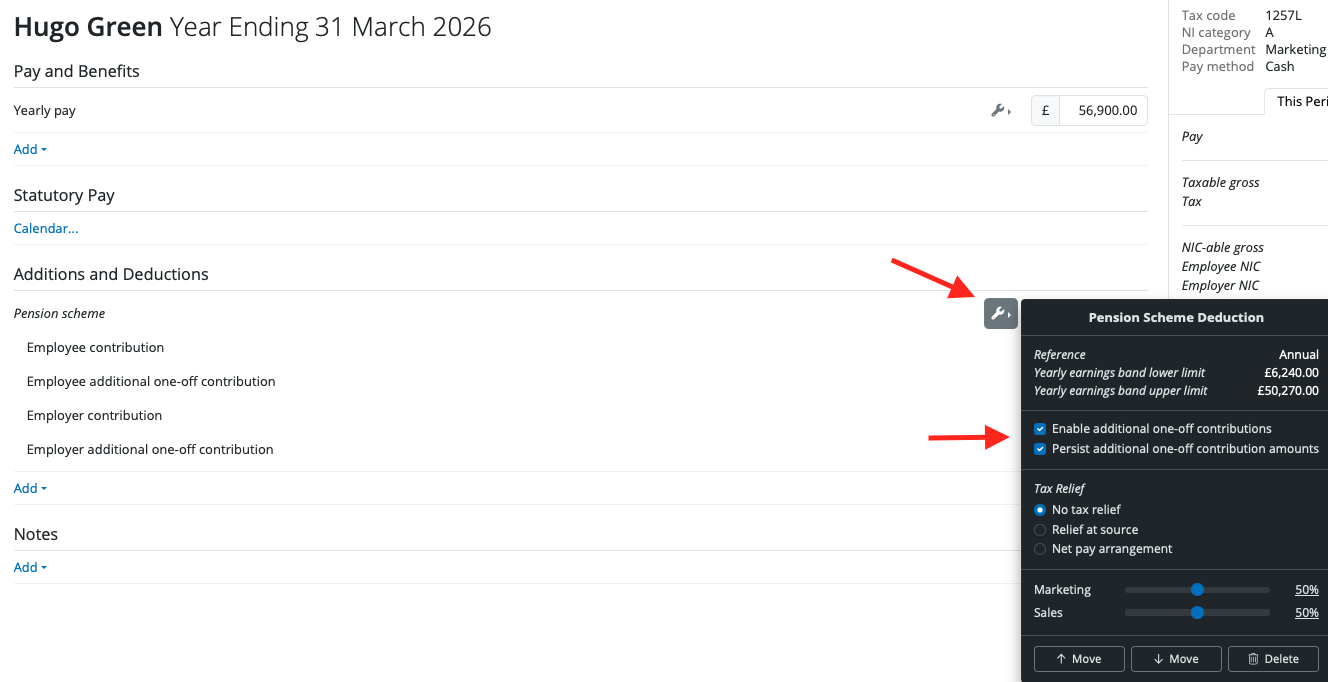
The AVC will now carry forward to every subsequent pay period until such time that you remove it.
You can only have 1 AVC line per pension on the employee's payslip.
Removing an AVC
To remove an employee / employer AVC; click on the spanner icon on the pension scheme line and untick 'Enable additional one-off contributions'. The additional AVC lines will now disappear from the payslip.
The amount shown on the main screen of the payslip is the gross amount & the amount taken from the employee will be the net amount (reduced by the tax relief at source).
Example: If the employee wishes the NET amount to be £25, then you will need to gross it up to £31.25 on the main payslip page and the net amount taken from the employee will be £25.
You should not change the tax relief method, just gross up the amount as per above.
Note: AVCs in BrightPay will follow the same earning rules as the pension scheme they are set up with:
- If the main pension uses standard qualifying earnings and the AVC is set as a percentage (%), BrightPay will apply qualifying earnings bands to the AVC as well.
- If the main pension uses a net pay arrangement, the AVC will also use the net pay arrangement method.
- If you want the AVC to be calculated based on a specific amount (rather than bands or qualifying earnings), set the AVC as a £ basic amount. You will need to manually calculate / enter the correct figure with 'basic amount'.
Comments
0 comments
Article is closed for comments.