
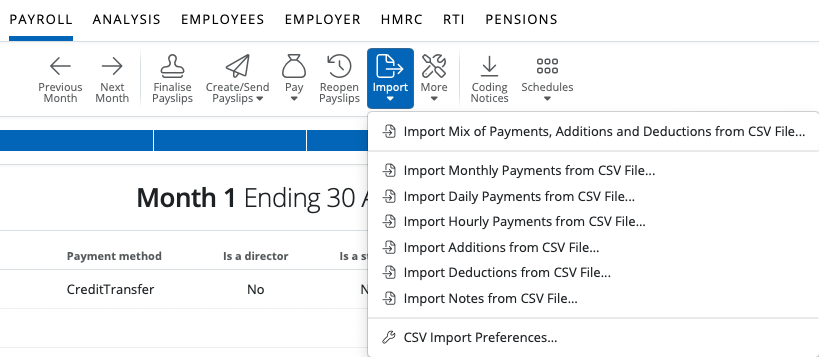
To import additions each pay period, go to Payroll > More > Import > Import Additions from CSV File:
1) Select a CSV File to upload or enter/paste CSV content on the screen.
2) Select 'Continue'
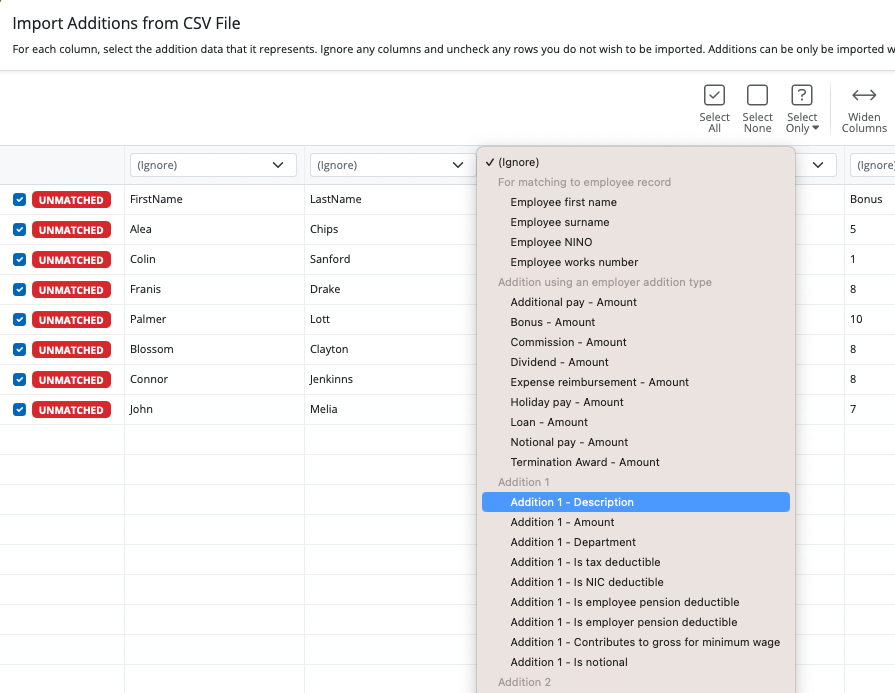
3) Your employee data will be displayed on screen. For each column, choose the payment data it represents. Ignore any columns and uncheck any rows you do not wish to be imported.
- To assist with column selection, simply select 'Match Header Row'. BrightPay will try and match as many columns as it can for you
- Also indicate whether you would like to replace the equivalent pay items that are already present on the employees' payslips with the new amounts being imported in by selecting/de-selecting 'Replace Existing' under 'Options'.
- Should you wish to remember your column selection for future imports, instruct BrightPay to 'Remember Column Selections' under 'Options'.. BrightPay will subsequently remember the column selection used in the previous import when next importing a CSV file.
-
Should you wish to reset your column selection at any time, select 'Reset All Columns'.
4) Click Import to complete the import of your payment information.
Fields which can be imported into BrightPay using the 'Additions' CSV File option are:
For matching to employee record:
Employee first name
Employee surname
Employee NINO
Employee works number
Addition using employer addition type:
To allow for an amount to be allocated to an Addition Type set up within the Employer utility
Addition 1:
Description
Amount
Department
Is tax deductible
Is NIC deductible
Is employee pension deductible
Is employer pension deductible
Contributes to gross for minimum wage
Is notional
Addition 2:
Description
Amount
Department
Is tax deductible
Is NIC deductible
Is employee pension deductible
Is employer pension deductible
Contributes to gross for minimum wage
Is notional
Addition 3:
Description
Amount
Department
Is tax deductible
Is NIC deductible
Is employee pension deductible
Is employer pension deductible
Contributes to gross for minimum wage
Is notional
Addition 4:
Description
Amount
Department
Is tax deductible
Is NIC deductible
Is employee pension deductible
Is employer pension deductible
Contributes to gross for minimum wage
Is notional
Addition 5:
Description
Amount
Department
Is tax deductible
Is NIC deductible
Is employee pension deductible
Is employer pension deductible
Contributes to gross for minimum wage
Is notional
Addition 6:
Description
Amount
Department
Is tax deductible
Is NIC deductible
Is employee pension deductible
Is employer pension deductible
Contributes to gross for minimum wage
Is notional
Addition 7:
Description
Amount
Department
Is tax deductible
Is NIC deductible
Is employee pension deductible
Is employer pension deductible
Contributes to gross for minimum wage
Is notional
Addition 8:
Description
Amount
Department
Is tax deductible
Is NIC deductible
Is employee pension deductible
Is employer pension deductible
Contributes to gross for minimum wage
Is notional
Addition 9:
Description
Amount
Department
Is tax deductible
Is NIC deductible
Is employee pension deductible
Is employer pension deductible
Contributes to gross for minimum wage
Is notional
Addition 10:
Description
Amount
Department
Is tax deductible
Is NIC deductible
Is employee pension deductible
Is employer pension deductible
Contributes to gross for minimum wage
Is notional
A CSV file template for the above can be accessed here.
Comments
0 comments
Article is closed for comments.