
BrightPay allows you to record all types of reportable expenses and benefits that you provide to your employees:
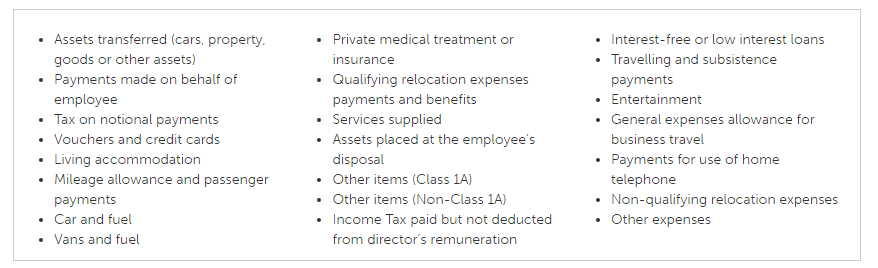
BrightPay can also produce an Expenses and Benefits submission (EXB) to send to HMRC after year end which includes your Class 1A NICs declaration (P11D(b)) and the P11D employee details for any expenses and benefits provided.
If you have registered for payrolling of benefits by 5 April 2025, 25-26 BrightPay also supports calculating the PAYE on expenses and benefits in each pay period.
Please note: benefits that cannot be payrolled are:
- Living accommodation
- Interest-free and low interest (beneficial) loans
Payrolling Benefits (PBIK)
Tax due on benefits and expenses is collected by adding a notional value to an employee’s taxable pay in payroll, rather than reporting them separately on a P11D. Tax is deducted or repaid as usual by reference to the employee’s tax code.
All payrolled benefits and expenses are included in a Full Payment Submission (FPS) as per HMRC's requirement.
The details of payrolled car benefits are included on the FPS. They are included in the first pay period in the tax year that the car is first payrolled. They are re-included in a subsequent submission if any of the car details change (with an “Amended” flag).
P11Ds are not required where benefits have been payrolled, however a P11D(b) declaration must still be submitted to HMRC at the end of the tax year. This declaration can be submitted using BrightPay.
Please note: Unfortunately the P46 form is not available within the BrightPay software - the form can be completed on-line on the Government Gateway or a postal submission can be made to HMRC.
Submitting P11D for Directors Not on Payroll
If directors receive benefits in kind (e.g. private medical insurance) but are not on the payroll:
- Add the directors as employees in BrightPay with a £0 salary and no pay schedule. This allows you to record their benefits without processing payroll for them.
- Go to Expenses & Benefits > P11D and add the relevant benefit(s) for each director.
- Complete and submit the P11D and P11D(b) as normal.
If you have already closed the tax year in BrightPay, you can still add the directors and file P11Ds — closing the year does not prevent P11D submissions.
The P11D filing deadline is 6 July following the end of the tax year.
The Taxable Benefits to Date field in the Mid-Year Totals tab is used to record the cumulative value of payrolled benefits processed by a previous system up to the point of moving to BrightPay. This ensures the year-to-date figure is correct for RTI and P60 purposes. However, because this is a single total figure, BrightPay has no way of knowing which specific benefit or benefits it relates to — particularly where an employee has multiple benefits or where a benefit had already ended before the move to BrightPay.
As a result, this figure does not automatically populate the PBIK report. For benefits to appear correctly in the PBIK report, they must be applied individually via Expenses & Benefits > Add Benefit for the relevant periods. This allows BrightPay to report each benefit accurately and in the correct detail required for PBIK purposes.
If you have moved to BrightPay part way through the tax year and need to reflect benefits already processed on a previous system, you will need to add these benefits manually through the Expenses & Benefits section in addition to entering the total in Mid-Year Totals.
When adding P11D benefits in BrightPay, the fields required will depend on the benefit type. For a beneficial loan you will need to enter the date the loan was made available, and for a company car benefit you will need to enter the relevant dates for the car - unless the benefit was for the full tax year in which case dates are not required. All other benefit types only require a cash value — no date entry is needed.
FAQ
Q. Why are BIK (benefit-in-kind) amounts not showing in the payroll journals?
A. BIK is treated as notional pay for tax purposes only and is not an actual payroll cost to the business. For this reason, BrightPay does not include BIK amounts in payroll journals.
- The employee does not receive this amount in cash.
- The employer’s real cost (for example, car lease, health insurance) is already recorded separately in the accounts.
- Including BIK/notional pay in payroll journals would double count the expense and distort payroll costs, cash, and liability figures.
Q. A car was provided to an employee right at the end of the previous tax year, but all payroll has been closed and submitted. How do I payroll the benefit in the new tax year for the few days in last tax year?
A. You can only include dates for the current tax year. If payroll has been closed and finished for the previous year, you can use the P11D method for the benefit. Enter the benefit onto the employee's record and chose P11D for the tax accounting method (this year only). Enter the details (list price, make, registration, C02, etc) and the date it was made available. The software will then calculate the cash value of the benefit for the few days (or weeks) that were not payrolled. Once added to the software, it will be included in the P11D(b) submission.
Q. Why is the BIK (Benefit in Kind) not appearing on my payslip?
A. To display BIK on payslips:
- Go to Create/Send Payslips > Download Payslip PDF For Multiple Employees > Customise.
Under the 'Amounts' section, enable 'Show notional pay' and 'Show benefit descriptions'.
Q. Can I submit P11Ds without submitting a P11D(b) to HMRC in BrightPay?
A. No. In BrightPay, you cannot submit P11Ds on their own. A P11D(b) must be included with your submission, and both are filed together as part of the complete end-of-year return for expenses and benefits to HMRC.
Q. I have added an expense to an employee, so why it is not appearing in the Payroll section?
A. If you have added an expense or benefit to an employee's record but it has not appeared on their payslip, there are several possible causes. Work through the checks below to identify and resolve the issue.
1. The expense was added after the payslip was already finalised - Expenses and benefits must be added before a payslip is finalised in order to be included in that pay period. If the payslip had already been finalised when the expense was entered, it will not appear automatically. To resolve: unfinalise the payslip for the relevant period, confirm the expense is showing, then re-finalise. Note that unfinalising a payslip that has already had an FPS submitted to HMRC will require you to submit an Additional FPS after re-finalising.
2. The car benefit start date falls outside the current pay period - For car benefits, an 'available from' date can be specified on the benefit record to indicate when the benefit begins. If this date falls after the current pay period, the car benefit will not be included in the payslip until that date is reached. This does not apply to other benefit types, which do not have a start or end date and will be included from the pay period in which they are added. To resolve: check the 'date from' on the car benefit record and confirm it falls within the period you are expecting it to appear. Amend the date if necessary.
3. The tax calculation method is still set to P11D rather than Payroll Benefits - For an expense or benefit to be processed through the payslip, the tax calculation method on the benefit record must be set to Payroll Benefits. If this has been left as P11D, it will need to report the benefit via the P11D process at year end rather than processing it through the payroll each period, and it will not appear on the payslip. To resolve: go to the employee's benefit record and check the tax calculation method. Update it to Payroll Benefits if you intend for it to be processed through the payroll.
4. The benefit cannot be payrolled - Certain benefits are not eligible to be payrolled and must always be reported via P11D. These are accommodation and interest free or beneficial loans.
Comments
0 comments
Article is closed for comments.