
This utility allows you to re-open the last pay period finalised or re-open previously updated pay periods in order to amend pay details for one or more employees. On re-opening a pay period, original pay details for each employee will be retained by the software allowing the user to amend accordingly.
To Re-open The Last Pay Period Finalised
To access this utility, click Payroll:
1) On the payment schedule bar, select the pay period you wish to re-open.
2) Click Re-Open Payslips on the menu toolbar.

3) Select the employee(s) you wish to re-open payslips for.
4) Click OK
The selected employee(s) payslips will now be available for editing and finalising again.
To Re-open More Than One Pay Period
To access this utility, click Payroll:
1) On the payment schedule bar, select the pay period from where you wish to re-open payslips. Pay periods falling after the pay period selected will subsequently be re-opened.
2) Click Re-Open Payslips on the menu toolbar.
3) Select the employee(s) you wish to re-open payslips for.
4) Click OK.
The selected employee(s) payslips will now be re-opened from the pay period selected and will be available for editing and finalising again.
Options when re-finalising payslips
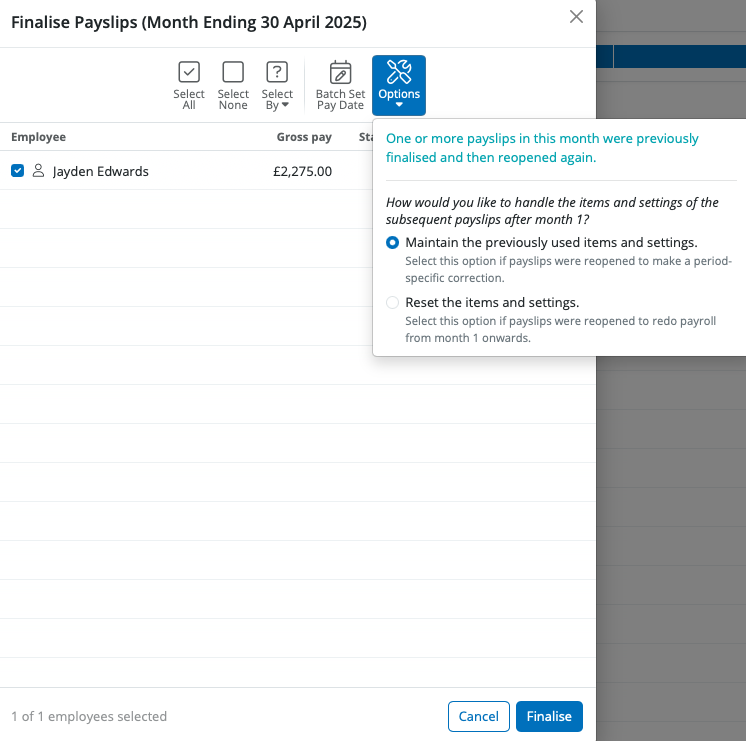
For payslips going forward, you will be given the following options:
- to maintain the previously used items and settings (e.g. if payslips were re-opened to make a period-specific fix)
- to reset the items and settings (e.g. if payslips were re-opened to completely redo the payroll from that period onwards)
Re-opening Payslips And Impact On Your RTI Full Payment Submissions
If you have already submitted one or more Full Payment Submissions (FPS) to HMRC for the payslips you have re-opened, the following should be noted:
- After re-finalising the payslips, if the employee's pay date matches the pay date that was included in the original FPS, an amended FPS will not be created.
- An Additional FPS should be submitted to HMRC to inform them of any amendments made to that period. An Additional FPS can be prepared and submitted to HMRC within the RTI menu.
If a different pay date is used on the employee's payslip, a new FPS will be created - please note submitting a new FPS using a different pay date may cause reconciliation issues with HMRC.
- If, however, an FPS has been created but not yet submitted to HMRC, any amendments made to an employee's payslip will be automatically updated within the unsent FPS when the payslip is finalised again. If all employees' payslips are re-opened, the unsent FPS will be deleted altogether.
When you reopen an older payslip, make amendments, re-finalise, and submit an Additional FPS, this will only correct the Year to Date (YTD) figures for that specific period. HMRC will not automatically update the YTD for any subsequent periods that were already submitted.
To ensure HMRC has the correct YTD information for all periods going forward, you will need to work through each period in order:
- Finalise the next pay period after the correction
- Submit an Additional FPS for that period with 'Correction to Earlier Submission' as the Late Reporting Reason
- Repeat for every period that was previously submitted, working from oldest to newest, until all periods are updated with the correct YTD figures
Once all periods are up to date, you can continue processing payroll as normal going forward.
FAQs
Q: How do I enter a start date for an employee that falls in a previous month without opening or re-running the previous pay period?
A: You can safely enter a previous start date without reopening or re-running payslips for other employees.
Here’s how it works:
- Enter the correct start date on the employee’s record.
- BrightPay will then create an open payslip for this employee in the pay period where the start date falls.
- You can process pay for that employee in that earlier period, and it will not affect any other employees’ payslips for that week/month.
- BrightPay will generate a new FPS submission for that employee only for that period.
If there is no pay to record for that earlier period, you can simply enter £0.00 for that employee’s pay and finalise the payslip, so you can move on to the next period as normal.
Comments
0 comments
Article is closed for comments.