
What is a Direct Earnings Attachment?
In 2013, the Department for Work and Pensions (DWP) introduced Direct Earnings Attachments as a method to recover money owed to DWP.
A DEA has its own regulations and operates differently from other orders such as Deduction from Earnings Order (DEO), Attachment of Earnings Order (AEO) and Council Tax Attachment of Earnings Order (CTAEO). A DEA does not replace any of these other orders and in some circumstances employers may receive requests to implement deductions for multiple orders for the same employee.
DWP are responsible for recovering monies as a result of debt arising under the Social Security Administration Act 1992.
Where the Secretary of State has been unable to recover monies owed to the DWP from customers, those monies may be recovered by deduction from the customer's earnings.
Where a DEA is to be implemented, the DWP will send an employer a formal notice to inform them of this.
When a DEA notice is received, an employer has the legal obligation to:
- calculate a deduction based on the net earnings for each pay date (see tables below)
or
- apply a fixed amount calculated by the DWP if they ask you to do so (usually only in exceptional circumstances)
How is a DEA calculated?
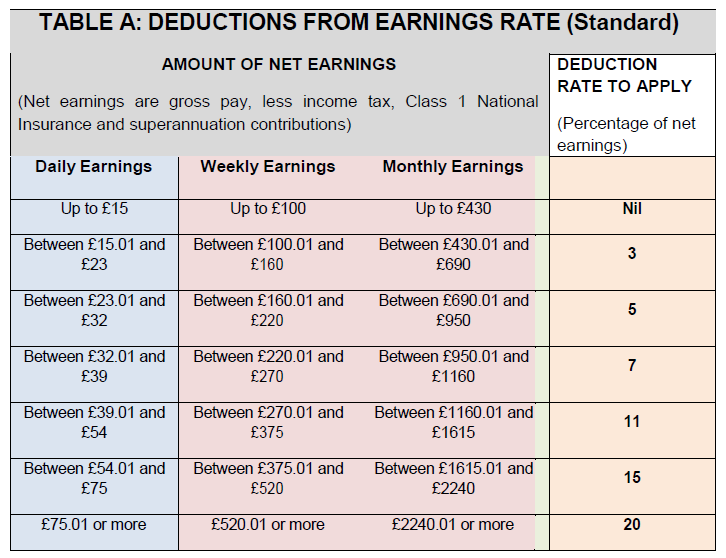
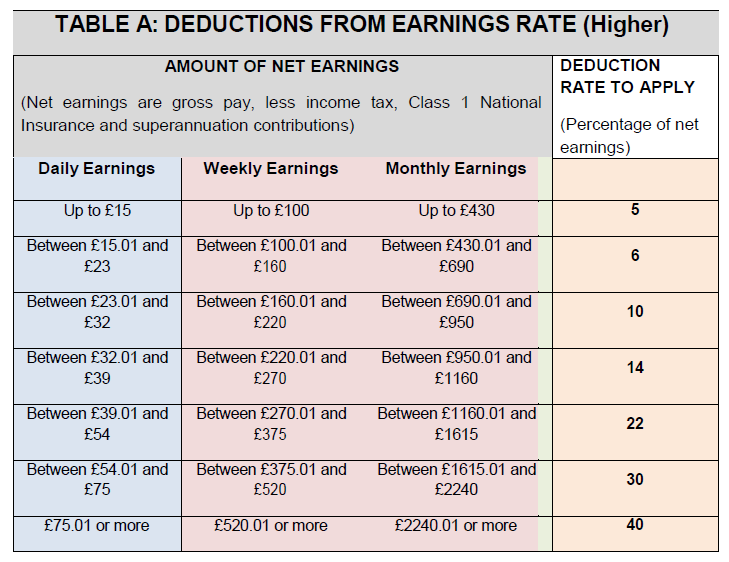
There are two deduction percentage rates for calculation – Standard Rate and Higher Rate.
The DWP will inform the employer which of these rates apply to an employee. The rate may change throughout the life of the DEA, from Standard to Higher and vice versa - in this instance, the employer will be notified of this by letter.
BrightPay will automatically calculate the employee's periodic deduction based on the tables below (unless the DWP requests a fixed amount to be deducted):
Standard Rate:
Higher Rate:
Protected Earnings
Where the DWP ask an employer to operate a DEA, the employer must consider what is known as the Protected Earnings amount which is an amount equal to 60% of an employee's net earnings.
This means that for each pay period where a DEA calculation is applicable and after adding the amount of the DEA to the total amount of other orders that may be already in place, the employee must be left with at least 60% of their net wage.
Administrative costs
For each pay period where a calculation results in a DEA deduction, an employer may take up to £1.00 from their employee’s earnings towards their administrative costs. This can be taken even if it reduces the employee's income below the 60% protected earnings amount.
Please note: you cannot deduct the admin charge of £1 if it takes your employee's income below the National Minimum Wage. It's a criminal offence for employers to not pay someone the National Minimum Wage or National Living Wage.
Employers should check National Minimum Wage and National Living Wage or contact the ACAS helpline for advice.
Attaching an Order to an Employee within BrightPay
Currently, BrightPay does not support the direct import of attachment orders (for Northern Ireland, Scotland, or England/Wales) via a bulk import or CSV file. Attachment orders must be entered manually for each employee within the software.
1) Go to Payroll and select the employee from the listing
2) Under Additions & Deductions, click the Add button
3) Select Attachment Orders…
4) Click ‘Add Attachment Order’ and select the appropriate Attachment Order from the listing.
Setting up the Order in BrightPay
Types and Dates
1) Enter a description for the Attachment Order.
2) Enter the reference number of the Attachment Order, which can be found on the documentation received. For a DEA, the “Reference” is typically used to hold the case or account identifier provided by the authority that issued the order.
3) Enter the date the Order was made.
4) Enter the date to apply the Order from.
5) Enter the date to stop – the Order should only be stopped once the full amount of the Order has been paid or you have received notification from the Courts to stop it.
Amount and Status
1) Priority – tick the box provided if the Order is a priority order.
2) Fixed amount - tick this box if the DWP requests that a fixed amount is to be deducted from the employee and enter the periodic amount to be deducted, as stated on the Order.
3) Admin Charge – tick the box provided if you, the employer, wish to deduct £1 as an administration charge for operating the Order.
4) Enter the total amount to be paid.
5) Cumulative amount paid at start - if the employee has already paid some of the attachment (for example in a previous employment) enter the amount here.
6) Description - enter short description of the type or name of the issuer
7) Enter any Year to Date deductions, if applicable
8) Click Save.
Notes
Use the Notes section to enter any relevant notes relating to the employee's attachment order
BrightPay will now apply the Attachment Order on the employee’s payslip from the relevant period.
Deduction of Earnings Orders (DEO) and Attachment of Earnings — amending the deduction amount
If you receive an updated Deduction of Earnings Order or Attachment of Earnings with a new deduction amount, you should not amend the existing deduction record. Instead, end the current deduction by entering an end date in the existing record so that it stops being taken from the employee's payslip. Then add a new deduction entry with the updated amount and a new start date.
When setting up the new deduction you have two options for handling any amount already paid against the original order:
- Enter the remaining balance — set the new deduction total as the outstanding amount still owed after previous deductions, leaving the cumulative amount paid at start as zero
- Enter the original full amount — set the new deduction total as the full original order amount and use the 'Cumulative Amount Paid at Start' field to enter how much has already been deducted under the previous record. BrightPay will then track the remaining balance correctly from this point forward
Either approach will give the same result.
If you have set up an attachment of earnings order but no deduction is appearing on the employee's payslip, check the following:
- Start date — confirm that the start date entered on the attachment order falls within the current pay period. If the start date is in a future period, the deduction will not apply until that period is reached.
- Employee earnings — attachment orders only apply once the employee's earnings reach above the minimum threshold. If the employee's earnings for the period are below this level, no deduction will be taken.
- Protected earnings — employees must retain at least 60% of their net earnings. If other deductions, reduced hours, or lower pay in the period would take the employee's take-home pay below the protected earnings threshold, the attachment order will not be applied for that period.
Comments
0 comments
Article is closed for comments.