
An employee's individual basic payments, additions and deductions can be set to always auto-zeroise each pay period, where this is desired.
- On an employee's open payslip, simply click the spanner symbol for the pay item you wish to set to auto-zeroise each pay period
- Tick the option 'Auto zeroise for each pay period'
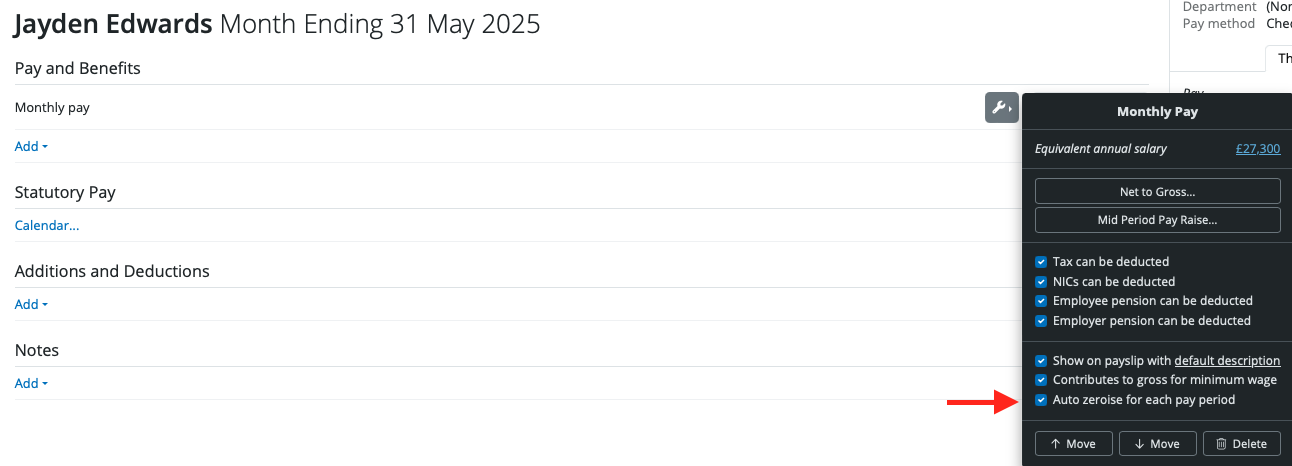
- Repeat for further pay items, where required
By default, certain pay elements will reset to zero at the start of each new pay run. To prevent a specific pay element from zeroing out and carry it forward instead, open the employee's payslip, click the spanner icon next to the relevant pay item and untick Auto zeroise for each pay period. BrightPay will then carry the value forward into subsequent pay runs until this setting is changed.
Please note: statutory pay can only be removed using the employee calendar. Attachment Orders can only be removed by editing the employee Attachment Order details.
If you have accidentally zeroised a pay period, there are two ways to recover the original figures:
Option 1 — Re-import from CSV (if you have the hours on file)
If the hours were originally imported from a CSV file, simply re-import the same file. Go to Payroll > Import and import the hours CSV again for the affected period.
Option 2 — Carry forward from the previous period
If the hours from the previous period were the same and you want to pull them through:
- Re-open the previous period's payslips (Payroll > Re-Open Payslips)
- Click Finalise Payslips
- Select the 'Options' spanner icon
- Select Reset items and settings
- This will carry all hours and pay items from the previous period into the current period, overriding anything currently on the payslips
Use with caution - Reset items and settings will completely override the current period's payslip data and replace it with the previous period's information. Only use this if the previous period's figures are the correct starting point.
If neither option applies, you will need to manually re-enter the correct figures for each employee.
Comments
0 comments
Article is closed for comments.