
In the event that you need to make a subsequent payment to an employee after they have left your employment (for example outstanding holiday pay), a dedicated facility is available within BrightPay to facilitate this.
- Within ‘Payroll’ select the pay period in which you wish to make the payment after leaving.
- Click ‘More’ on the menu bar, followed by ‘Add Payment After Leaving...'
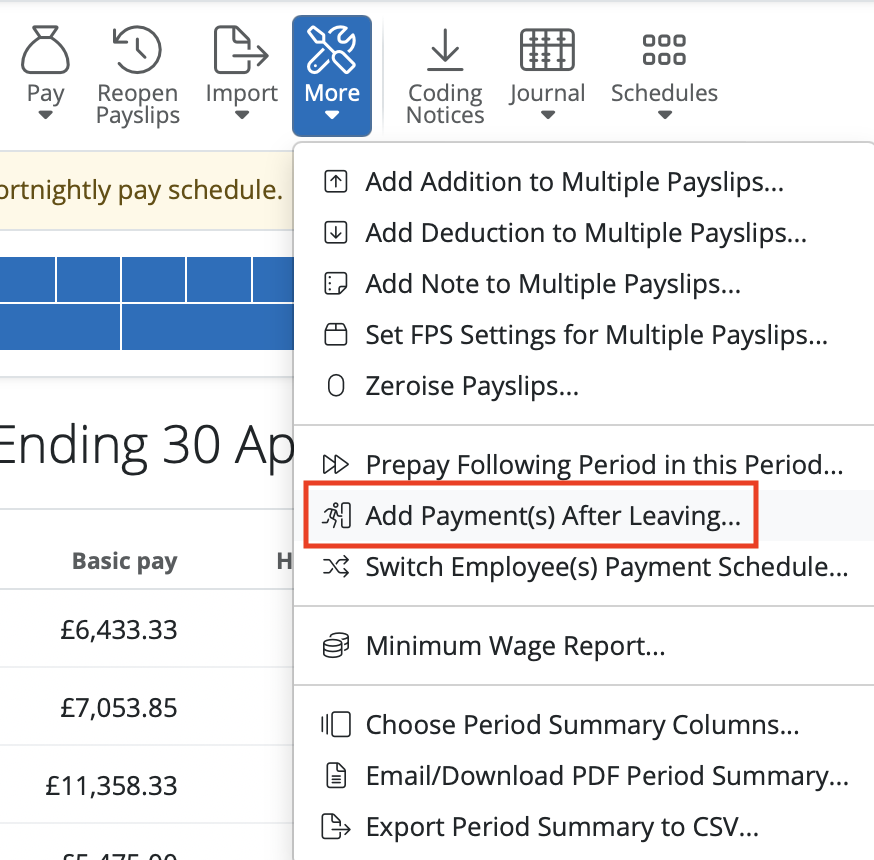
- Select the employee or employees in question and click ‘OK’. In line with HMRC guidance, all payment after leaving payslips will use tax code ‘0T’ on a week 1/month 1 basis.
- Process the employee’s payslip as required and finalise the payslip as normal.
The employee and their payment after leaving details will subsequently be included in the relevant FPS for submission to HMRC.
Note: If the payment is in a different tax year to when the employee left, you will have to re-add the employee (with original start and leave date) in order to see them as an option under 'Add Payment(s) after leaving'.
If you have created a payment after leaving payslip in error, click on the payslip and in the top right > click 'Delete'.
Income Tax (The "0T Week 1/Month 1" Rule): Once an employee has been issued a P45, HMRC mandates that any subsequent payment must use tax code 0T on a non-cumulative (Week 1 or Month 1) basis. This ensures they don't get a double allocation of tax-free Personal Allowance if they have already started a new job.
NIC will use the threshold / free allowance based on the period in which you are processing the payment after leaving.
Comments
0 comments
Article is closed for comments.