
An employer-wide calendar is available in the Employer utility within the Client Portal, which amalgamates all employee events into a single view: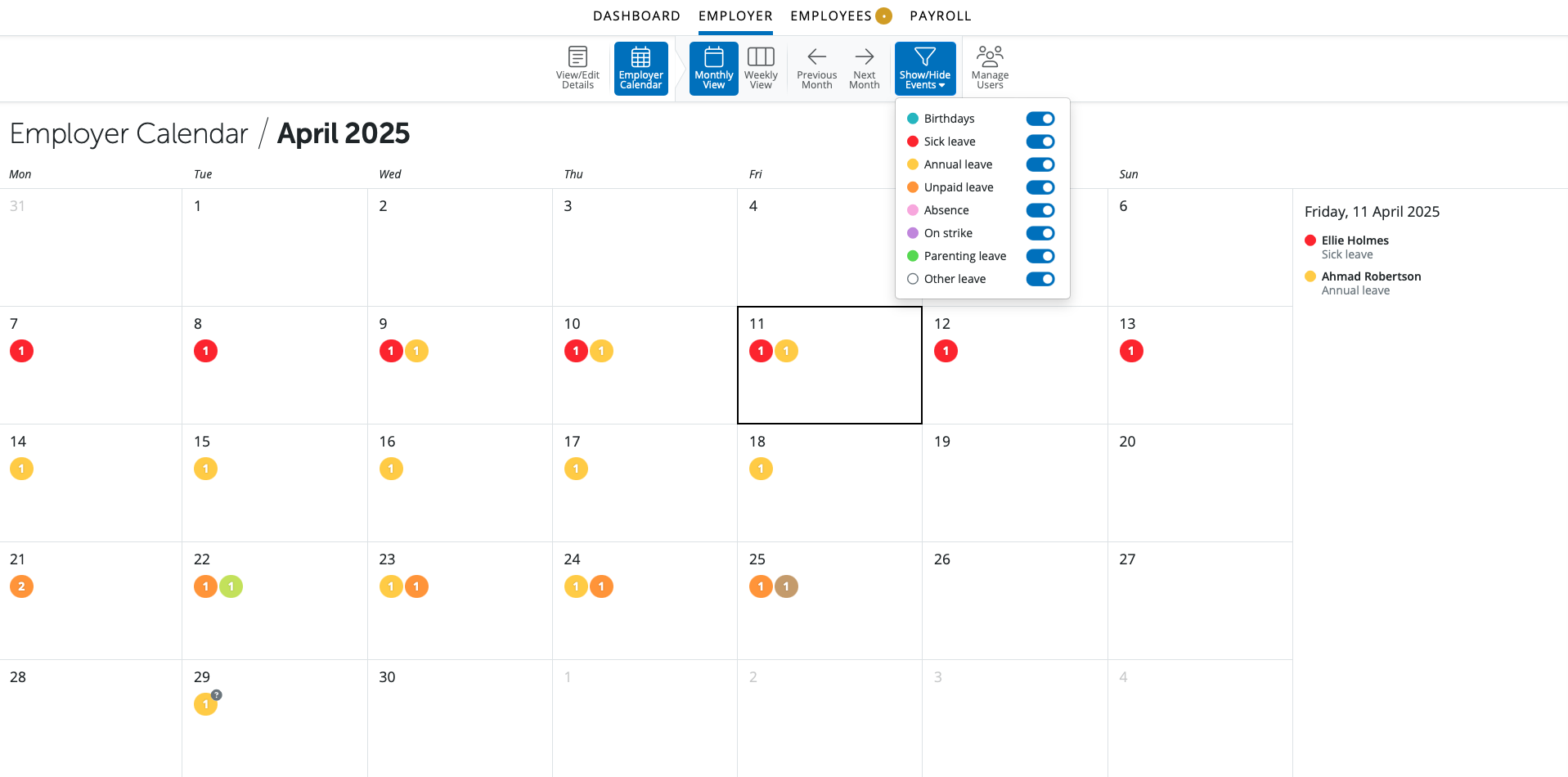
Key features:
- users can switch between Monthly or Weekly view.
- shows combined events for all employees (i.e. those entered on the employee calendar, as well as birthdays)
- ability to filter which kinds of events are displayed on calendar and in the day event list.
Please note: this option can be selected for all users or just super-users to view on the Client Portal.
To record a single leave type for multiple employees at the same time
- Click 'Employees' and select a relevant employee from the listing
- Select 'Calendar' on the menu toolbar to display the chosen employee's calendar on screen
- Select the leave date you wish to record as annual leave (or any other type of leave, ie custom leave types)
Next, click the drop down arrow on 'Annual Leave' on the right hand side of the calendar, followed by 'Set for Multiple Employees...'
- Select the employees for whom you wish to record the same annual leave date and click 'OK'
- The selected leave date will now be recorded on each applicable employee's calendar as annual leave
You can unset annual leave for Multiple Employees also, by following the same instructions.
Comments
0 comments
Article is closed for comments.