
Your new tax year - 2026/27 BrightPay software is Now Live!
You’ll be able to access the new tax year features and updates from now.
Every tax year we release brand new software in line with the new budgetary requirements.
To move your payroll to a new tax year, log in to BrightPay
Open the Browse Employers screen
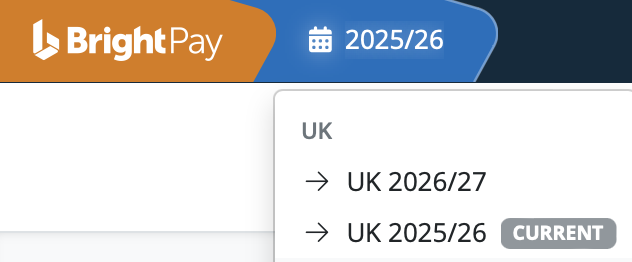
Select the appropriate tax year from the top-left corner.
Note: If you are currently in the company, please exit and return to the Browse Employers screen. You cannot import into the new tax year while inside the employer.

The option to select the 2026-27 tax year will be available on the dropdown menu.
Select this option to bring you forward to the 2026-27 tax year.
Your software for the new tax year will contain a seamless import facility to bring across your employee details from the previous tax year. In doing so, your previous year’s information will remain untouched and accessible.
If you do not see the UK 2026/27 option, try refreshing your browser and then clicking on the tax year icon again.
Please note:
BrightPay (cloud) has two billing options for customers:
Monthly subscription: Monthly payments are due and payable monthly in arrears by Direct Debit on the 4th of the following month or the next working day, based on your total number of active employers and employees in that month. Payments are taken automatically each month.
Annual payment: Annual payment plans are paid in advance and payable on the 4th of the following month based on the number of employers and employees you will need in that year. A discount will apply to annual payments. *
*Additional usage that is higher than the annual payment plan will be charged based on monthly subscription prices with overage payments taken automatically each month.
You do not need to download or install any software; all features, integrations, and payment processing are managed within your online BrightPay Cloud account.
Comments
0 comments
Please sign in to leave a comment.