
Here is a video tutorial for setting up a Director - Setting Up a Director
Director's NIC
By default, BrightPay will automatically apply the Annual Basis for NIC calculation for Directors, as this is the preferred method of collection by HMRC.
This means the Director will not start to pay employee NIC until they reach the PT (primary threshold) of £12,570. For more information on Directors' NICs and the alternate way to calculate NICs for directors, please see the help section on Directors' NIC which you can access here.
Setting Up A Director in BrightPay
To set up an employee as a director, click 'Employees':
1) Select the Employee from the employee listing, or if it is a new employee choose 'New employee'
2) Within the employee record, select their 'Tax/NICs/RTI' section
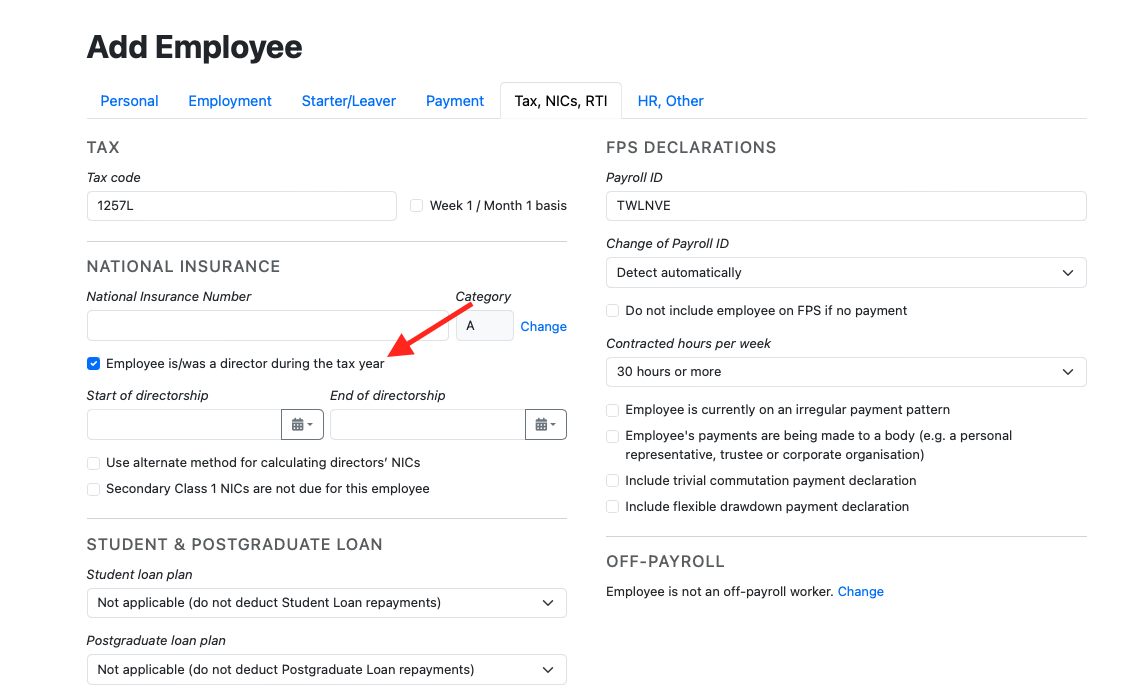
3) Tick to indicate that the employee is a director
4) Start/End of Directorship - If the director starts/ends their directorship during the tax year, enter these dates accordingly
5) Should you wish to apply the Pro-Rata basis for calculation of the Director's NIC as opposed to Annual Basis, tick 'Use alternate method for calculating directors' NICs'
6) Click 'Save'
Note: If an employee has been a director since before the start of the tax year you are processing on BrightPay, you should leave the 'Start of directorship' field blank. This field is only for directorships that started within the current tax year. If you wish to keep a record of the start of directorship which falls outside of the current tax year, you can use the Notes section with the HR tab.
Q. We have a new PAYE scheme with directors who live overseas and shouldn't pay Class 1 NIC — how should this be recorded in BrightPay so no employee/employer NI is calculated?
A. To stop BrightPay from applying both employee and employer NIC on payroll payments processed, click on spanner icon on the pay element(s), ie monthly pay or hourly pay line within the employee's payslip and untick 'NICs can be deducted'. Check with HMRC if you are unsure on how an overseas employee / director should be processed, BrightPay cannot advise on best practices with this scenario.
Comments
0 comments
Article is closed for comments.