
Role of an Owner
The Owner role has full control over the Organisation, with the ability to edit Organisation details, add other Team Members, manage Billing, add employers and manage all employers, including employers marked for admin access only.
When an organisation is created by a user the user becomes the Owner by default. There can only be one Owner per organisation.
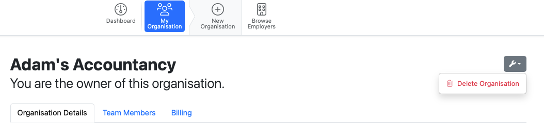
An Owner can delete the organisation but selecting > My Organisation > Select the Spanner > 'Delete Organisation'.
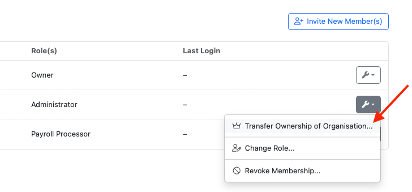
An Owner can transfer the organisation ownership to another Team member under > My Organisation > Team Members > Select Spanner opposite the Team Member > 'Transfer Ownership of Organisation'.
An Owner can invite all Team members for the organisation and delete or edit all Team members for the organisation.
An Owner has the ability to manage the Organisation Billing and be used as a ‘billing contact’ for paying organisation bills for BrightPay
Please Note: The Team Member in the Organisation can access the employer (s) on the Client Portal that they have permission to view in BrightPay.
Role of an Administrator
An Administrator has nearly full control over all aspects in an organisation.
An Administrator can invite other Team Members like Payroll Processors and Billing Manager.
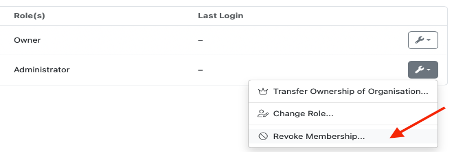
If required an Administrator has the permission to revoke membership of a Team Member such as Payroll Processors or Billing Manager.
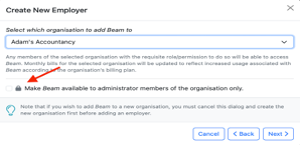
The Administrator is able to create an employer to add to that organisation and also make the employer available only to administrator team members only. With this permission an administrator can view employer in the organisation that are marked as admin only.
An Administrator can also access and view Billing details for the Organisation.
Role of a Payroll Processor
A Payroll Processor can open and access all employers in the Organisation except employers that are marked available to administrator members of the Organisations.
A Payroll Processor cannot edit the Organisation's details, manage other Team Members or access Billing details.
Role of a Billing Manager
A Billing Manager will be able to access billing details and invoices for the Organisation. They cannot edit organisation details, manage team members or access any employers in the Organisation.
FAQs
Q. Can two or more people add or process data at the same time in the cloud payroll?
A. Yes. Multiple team members can work in the same payroll at the same time, adding and updating information concurrently. You will also see the initials of any other user who is in the payroll, either on the same page as you or beside the employee record they are currently viewing or editing.
Note: To protect your internal payroll from payroll processor employees (who may process payroll for other companies):
- Set up your internal payroll with access restricted to admin users only by enabling the option "Requires admin role to access" on the internal payroll employer record.
- Assign your employee as a payroll processor role for other employers, not for your practice’s internal payroll.
- This way, the payroll processor can access and process other companies’ payroll but will not be able to view or access sensitive internal payroll information, which is reserved for admin users.
This allows you to protect sensitive payroll data within your own practice while letting processors work with other clients’ records.
There is no dedicated read-only or report-only role for team members in BrightPay Cloud. However, if you need someone to be able to view payroll details and run reports without the ability to make any changes to payroll figures, you can invite them as a client via the Client Portal.
A client can view payroll information and run reports but cannot access or amend payroll figures. This is the most appropriate option where read-only access is required.
To set this up, invite the user as a client in BrightPay Cloud and they will be able to log in via the Client Portal to view and export the information they need.
Comments
0 comments
Article is closed for comments.