
A tax code is used by an employer to calculate the amount of tax to deduct from an employee's pay. It is worked out by HM Revenue and Customs (HMRC), who sends it to the relevant employer.
A tax code is usually made up of several numbers and a letter, for example: 1257L or K497.
If the tax code is a number followed by a letter
If you multiply the number in the tax code by £10 plus £9, you'll get the approximate total amount of income the employee can earn in a year before paying tax.
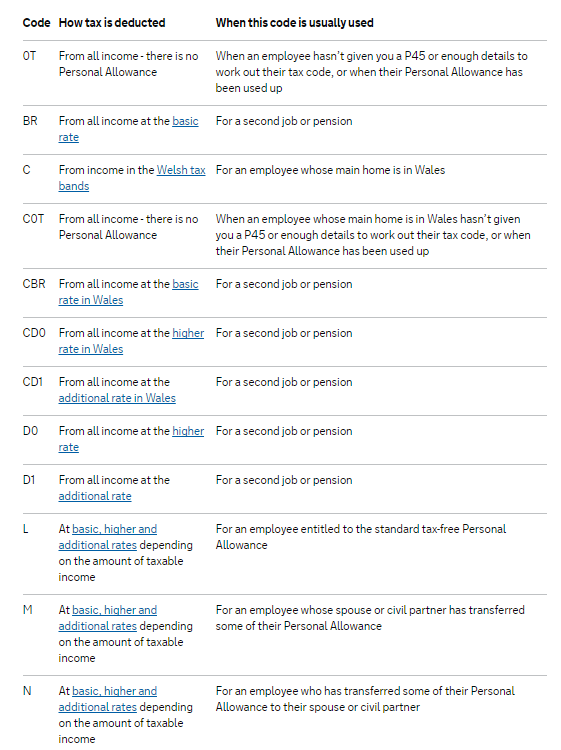
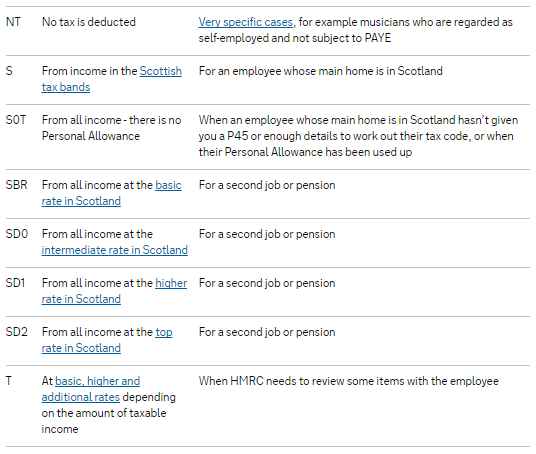
The letter in the tax code refers to the employee's situation and how it affects their Personal Allowance.
What the Codes mean
How tax codes are worked out
Step one
Your tax allowances are added up. (In most cases this will just be your Personal Allowance and any Blind Person's Allowance. However, in some cases it may include certain job expenses.)
Step two
Income you've not paid tax on (for example untaxed interest or part-time earnings) and any taxable employment benefits are added up.
Step three
The total amount of income you've not paid any tax on (called 'deductions') is taken away from the total amount of tax allowances. The amount you are left with is the total of tax-free income you are allowed in a tax year.
Step four
Broadly speaking, to arrive at your tax code the amount of tax-free income you are left with is divided by 10 and added to the letter which fits your circumstances.
For example, the tax code 117L means:
You are entitled to the basic Personal Allowance
£1,170 must be taken away from your total taxable income and you pay tax on what's left
The tax code spreads your tax-free amount equally over the year so that you get about the same take-home pay or pension each week or month.
How the 'K code' works
If your deductions (untaxed income on which tax is still due) are more than your allowances you'll be given a K code, to ensure you pay tax on the excess. Whereas with other tax codes the number indicates the amount of income you can have tax-free, the number in a K code multiplied by ten broadly indicates how much must be added to your taxable income to take account of the excess untaxed income you received.
K code example
K497 means:
Your untaxed income was approximately £4,970 greater than your taxable income
As a result, approximately £4,970 must be added to your total taxable income to ensure the right amount of tax is collected
(The actual calculation is more complex and of course precise - and ensures that the exactly right amount is added to your taxable income.)
If your tax code has ‘W1’ or ‘M1’ at the end
W1 (week 1) and M1 (month 1) means your tax is based only on what you are paid in the current pay period, and not the whole year. These codes are sometimes known as ‘non-cumulative’ and are mainly used as emergency tax codes.
FAQs Tax (PAYE)
Q. When an employee receives a tax refund, does the employer pay this back, or does HMRC handle it? How does this work?
A. When a tax refund occurs, it reduces the PAYE liability for that period. Essentially, the refund comes off the amount the employer owes to Revenue, so the employer is not paying the refund directly. Instead, it reduces the amount due to Revenue for that tax month.
Q. I have received a tax code with a letter 'X' at the end and the software will not accept it - how do I update the tax code?
A. If you receive a coding notice from HMRC with the letter 'X' at the end - this means HMRC require that you put the employee on a week 1 / month 1 (w1/m1) basis. For example 895LX on the coding notice means enter 895L in the tax code field and then tick the box for 'week 1 / month 1' next to it, then save changes.
“BrightPay does not accept 'X' at the end of a tax code; you must remove it and tick the week 1/month 1 box”
Trouble shooting BR tax code for part time or new employees with a P45
If the employment is a new employee's 2nd job, then you would not enter the P45 details into the system. The P45 is for an employee's main job, so if the figures have been entered, remove the previous employment amounts and use starter declaration C with no previous employment.
If a part time employee was already employed with a BR tax code and then the employment becomes the employee's main role and they provide a P45, enter the previous employment figures from the P45 into BrightPay and use the same tax code as on the P45 (not BR).
Entering previous employment figures from a main employment and using a BR tax code could result in higher than 20% tax (usually up to 50% using the regulatory limit).
Trouble shooting different tax amount from one period to another with same tax code
Cumulative tax codes (ie without w1/m1) are calculated on a YTD basis. The tax in each period is calculated based on the YTD including the payment in the current period. There could be many reasons why the tax is being calculated as it is and is different to what you are expecting. A few examples might be;
- A pay rise or bonus could result in some of the employee's salary now being pushed into a higher tax bracket for that period.
- The same pay at the end of the previous tax year would have been calculated on YTD earnings, the start of the new year means that their tax allowance is split equally between the available periods on the schedule - 52 for weekly, 26 for fortnightly, 13 for 4-weekly, 12 for monthly. In the previous year the earnings for each period might be the same, but their YTD meant their tax was lower or higher in the previous tax year. In the new year all allowances and YTD is reset meaning the tax is calculated based on the pay in that first period and the tax code entered into BrightPay as their is no YTD value.
If an employee is being taxed unexpectedly (for example, with tax code 1257L and total annual earnings under the threshold of £12,570), check for any previous earnings entered into their record.
While reviewing payroll, use the employee’s payslip and click on the YTD (Year-to-Date) tab to see if any prior earnings have been included. Previous earnings (e.g., amounts processed before joining your payroll or entered manually when setting up the record) will add to their YTD total and may push them above the tax-free threshold, resulting in tax being deducted.
Make sure YTD information is accurate and matches what the employee has earned in your payroll system.
If previous employment figures have been entered incorrectly or by mistake, you can re-open the payslip (if required) and then click on the 'Edit settings' icon > Employment tab > Amend or remove any previous employment figures that are incorrect > click 'OK' to Save.
Note: If a director (or any employee) receives a single payment of £10,000 in one single month only (ie month 2), PAYE will be deducted because tax codes only allocates a proportion (month-by-month) of the annual allowance. The PAYE system does not grant the whole year’s allowance at once, even if no pay has been issued previously or will not receive any other pay in the tax year. To recover the taxed amount, you can process zero pays for the remaining periods and BrightPay will refund the tax during the year, or the employee can claim a refund directly from HMRC after the tax year ends. The employee's status as a director only affects NIC calculations (if annual method used), not PAYE.
There is no report in BrightPay that identifies employees by tax rate bracket. You can add the tax code column to any report in the Analysis section, however BrightPay displays tax codes only — it is not possible to filter or report by tax rate percentage (ie 20%, 40%, 45%).
Comments
0 comments
Article is closed for comments.